Habits live in the Agenda, not inside a note. Each habit has a daily goal, the days it counts and, if you like, a time with a reminder. The example in this guide uses two habits: drinking water and reading for 20 minutes.
1. Where habits live
Open the Agenda from the home screen ⋮ menu → Agenda. At the top of the day is the Today’s Habits card, with how many you have completed.
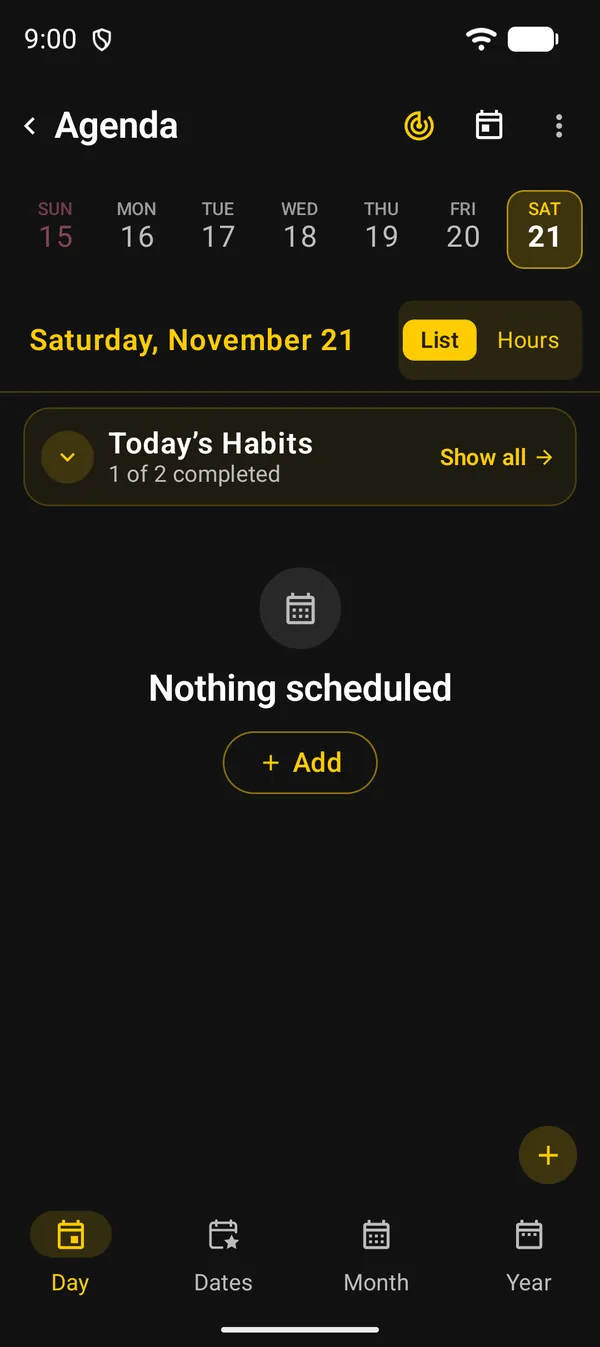
| Where | What it does |
|---|---|
| Show all | Opens the Today’s Habits list |
| Arrow on the left of the card | Shows or hides the day’s habits, each with its log button |
| Target icon at the top | Habits: opens the same list |
| Agenda + | Has an Add habit shortcut |
When the day has no habits, the card’s button reads Add habit.
2. Create a habit
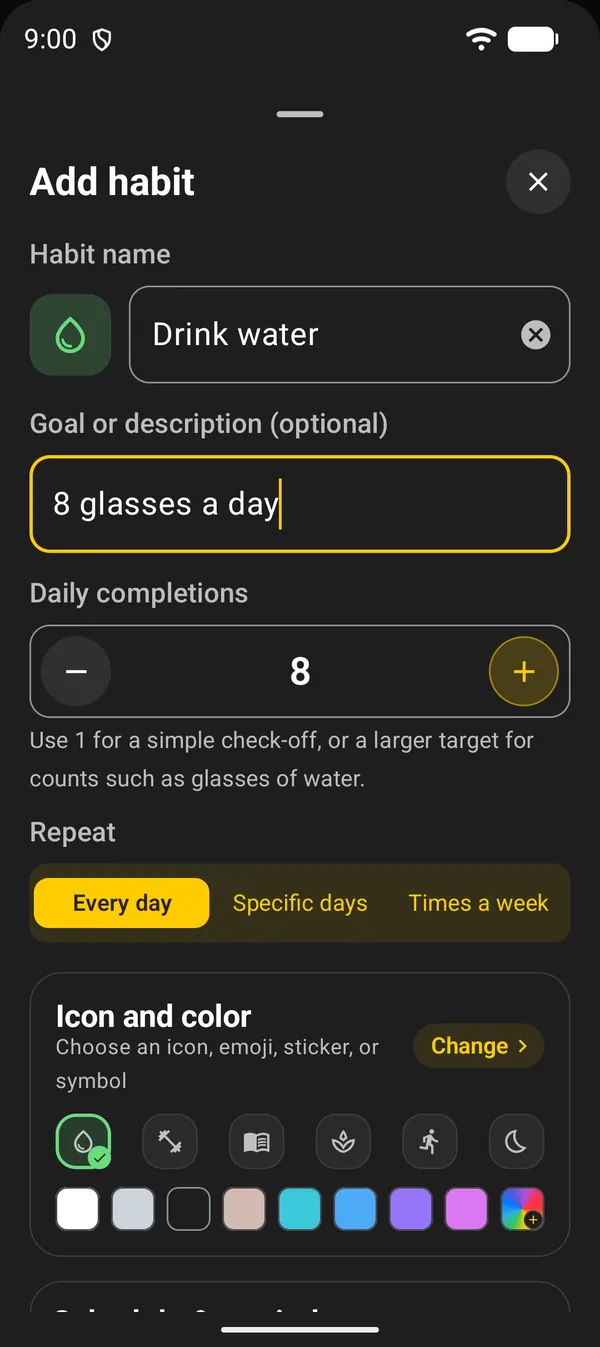
In the Today’s Habits list, tap Add habit and fill in:
- Habit name: for example, “Drink water”.
- Goal or description (optional): a short note, such as “8 glasses a day”.
- Daily completions: use 1 for a simple check-off. Use a larger number, up to 99, for habits you count, such as glasses of water.
- Repeat: choose when the habit counts (table below).
- Icon and color: tap a shortcut, or Change to pick an emoji, icon, sticker or symbol.
- Tap Save.
| Repeat | When the habit counts |
|---|---|
| Every day | Every day |
| Specific days | Only on the days you pick. Starts as Monday to Friday |
| Times a week | A quota of 1 to 6 times a week, on any days. Once the quota is met, the week is done |
3. Time and reminder
Further down, under Schedule & reminder:
- Show at a time in agenda puts the habit in the day’s list at the time you choose.
- Daily reminder notifies you at that time. It only turns on when a time is set. If the app’s notifications are off, DicaNote asks for permission when you save.
The notification has Mark as done. A counted habit also gets +1.
4. Log your progress
In the Today’s Habits list, tap the round button on the right of the habit:
- A habit with a goal of 1: one tap checks the day, another tap unchecks it.
- A counted habit: each tap adds 1. The ring and the dots under the name show how far you are.
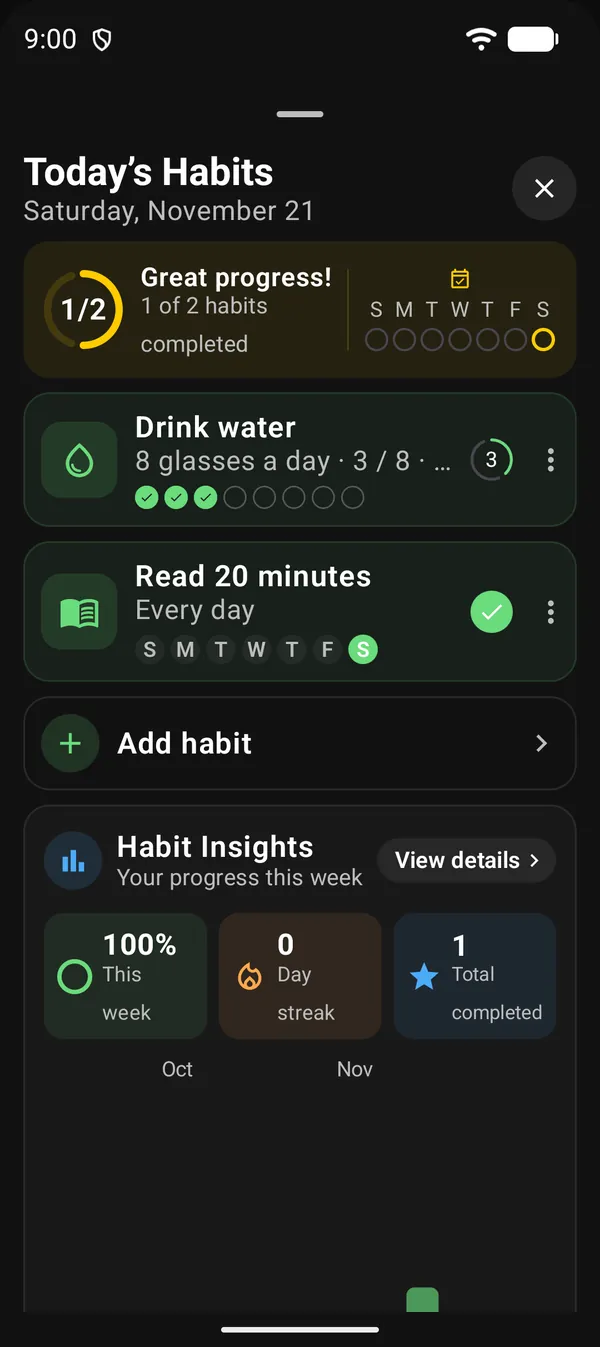
At the top of the list, the ring shows how many of the day’s habits are done. Beside it, the week’s dots light up on days when everything was completed.
For a habit with a time, the checkbox in the day’s list fills the whole goal at once. Future dates can’t be checked off.
5. Skip a day
Travelling or sick? In the habit’s ⋮ menu, tap Skip this day. A skipped day doesn’t count and doesn’t break the streak. To take it back, use Undo skip in the same menu. Logging progress that day also undoes the skip.
Times a week habits don’t have this option, because the quota is already flexible.
6. Details, editing and deleting
Tap the habit’s name to open its details. There you see a grid of recent weeks, pick a day and correct its count with − and +. Below are Current streak, Best streak and Last 7 days. For a times-a-week habit, the streak is counted in weeks.
The habit’s ⋮ menu has:
| Option | What it’s for |
|---|---|
| Habit details | Opens the details |
| Edit habit | Changes the name, goal, repeat, icon and time |
| Skip this day | Excuses the day, as in section 5 |
| Move up / Move down | Changes the order of the list |
| Delete | Deletes the habit and its whole history |
7. Habit Insights
At the end of the list is the Habit Insights card, which adds up all your habits:
| Number | What it counts |
|---|---|
| This week | How much of what was due this week is done |
| Day streak | Days in a row with every habit completed |
| Total completed | Every habit-day completed so far |
Below the numbers is a grid: the deeper the green, the more habits were done that day. View details opens a list by habit, with each one’s last 7 days and streak. Tap a habit in that list to open its details.
Next guides
FAQ
Does skipping a day break my streak?
No. A skipped day counts neither for nor against you. Use Skip this day in the habit's ⋮ menu.
I forgot to log yesterday. Can I fix it?
Yes. Open the habit's details, tap the day in the grid or in the week row, and use +.
What's the difference between a goal of 1 and a larger goal?
With 1, the habit is a check-off: done or not done. With a larger number, each tap adds 1 and the day only counts as done when it reaches the goal.
Are habits included in backups?
Yes. Backups include your habits and their history. See the backup guide.